Lesson 7: Forms & User Input (Making it Interactive)
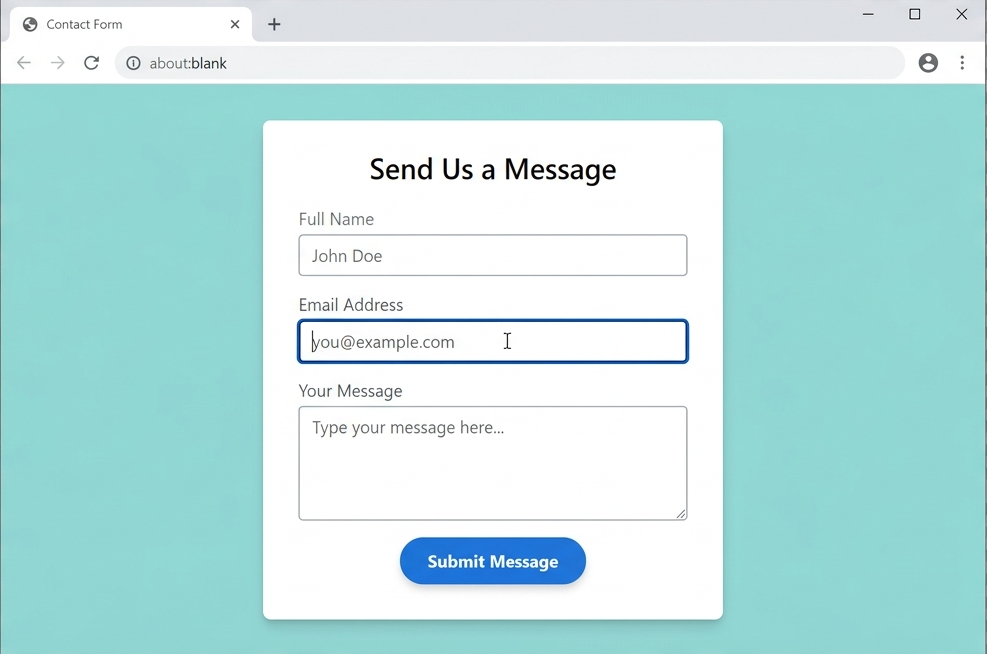
A form is a container for different types of input elements, like text boxes, checkboxes, and buttons.
1. The <form> Container
The <form> tag wraps all your inputs. It has two critical attributes that connect it to your PHP:
action: The name of the PHP file that will “handle” the data (e.g.,process.php).method: How the data is sent. We usually usePOSTfor security.
2. The Core Form Elements
To build a professional form, you need three main tags:
A. The <label> Tag
Never skip this! Labels tell the user what to type. They are also vital for accessibility.
- Pro-Tip: Use the
forattribute to link the label to the input’sid.
B. The <input> Tag
This is where the user types. The type attribute changes what the box does:
type="text": For names or usernames.
type="email": Ensures the user enters a valid email address.
type="password": Hides the characters as they are typed.
C. The name Attribute
This is the most important part for a PHP developer! When your PHP script looks for data, it looks for the name. If you don’t give your input a name, your PHP won’t be able to “see” the data.
3. A Complete Contact Form Example
Here is how you would code a basic contact form for your site:
<form action="contact-process.php" method="POST">
    <label for="username">Full Name:</label><br>
    <input type="text" id="username" name="user_name" placeholder="Enter your name" required>
    <br><br>

    <label for="useremail">Email Address:</label><br>
    <input type="email" id="useremail" name="user_email" required>
    <br><br>

    <label for="msg">Your Message:</label><br>
    <textarea id="msg" name="user_message" rows="4" cols="30"></textarea>
    <br><br>

    <button type="submit">Send Message</button>
</form>🛠️ Practice Task: Create Your First Form
1. Copy the code above into your index.html file.
2. Add a new input with type="date" so the learner can tell you when they started their coding journey.
3. Open the file in your browser and try typing in it!
Note: Since you haven’t built contact-process.php yet, clicking “Submit” will give you an error—but that’s okay! We will build the PHP part later.

VT88slot is my go-to for spinning those reels. Loads of different slots, and the payouts are pretty decent. Give it a whirl and see what you think. Spin those wheels: vt88slot