Lesson 9: Attributes, IDs, and Classes (The Hooks)
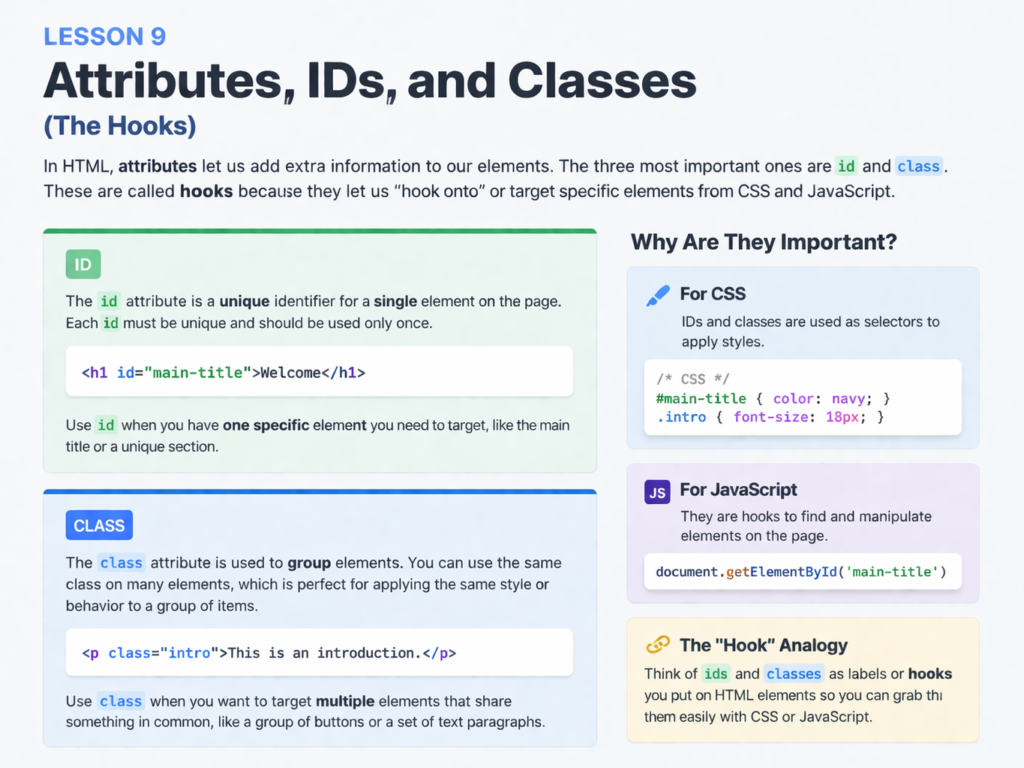
Attributes provide extra information about an HTML element. Some attributes are specific to certain tags (like src for images), while ID and Class can be used on almost any tag.
1. What is an Attribute?
An attribute always sits inside the opening tag and usually comes in a name="value" pair.
Common Attributes:
href: Used with<a>to define a link.
src: Used with<img>to define an image source.
alt: Used with<img>for descriptions.
placeholder: Used with<input>to show hint text.
2. The “Class” Attribute (The Team)
A Class is used to group elements together so you can style them all at once. Think of it like a “uniform” for a sports team. Multiple elements can have the same class.
The Code:
In CSS, you would target .tutorial-text to change the color of both paragraphs at once.
3. The “ID” Attribute (The Individual)
An ID is a unique identifier. Think of it like a “Social Security Number” or a “Passport Number.” On any single webpage, an ID name can only be used once.
The Code:
In CSS or JavaScript, you use #main-header to target this specific, unique box.
Class vs. ID: Which one to use?
5. Using Multiple Classes
One of the most powerful things about classes is that an element can have more than one. You just separate them with a space.
The Code:
This button gets the general “btn” styles, the “blue” color, and the “large” size all at once.
🛠️ Practice Task: Label Your Site
- Open your
index.html.
- Give your
maintag an ID:<main id="content-area">.
- Find your
<ul>list of links and give each<li>a class:<li class="nav-item">.
- Add a special ID to your submit button in the form:
<button id="submit-contact">.

1 Response
[…] Previous Next […]