Lesson 6: HTML5 Semantic Tags (SEO Secrets)
Excellent! We are moving into Lesson 6, and this is where we separate the “hobbyists” from the “professionals.”
When you look at a website, you see a header, a sidebar, and a footer. In the old days, developers used the generic
<div>tag for everything. Today, we use Semantic HTML5. This is the secret to high traffic because it tells Google exactly what each part of your page represents.
HTML5 Semantic Tags (SEO Secrets)
“Semantic” is just a fancy word for “meaning.” A semantic tag tells both the browser and the search engine (Google) what its content is.
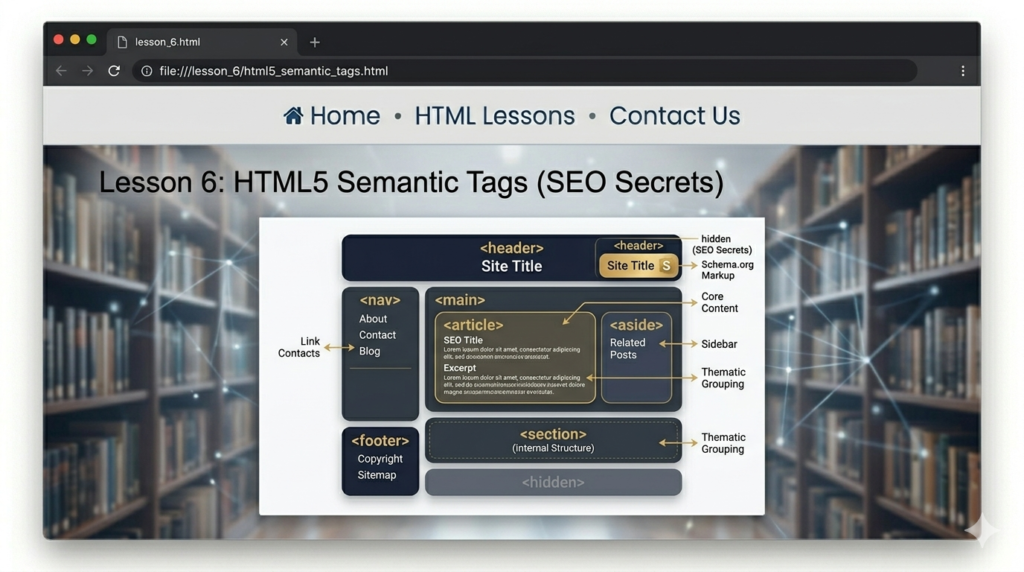
1. Why Semantics Matter for CodingLearners.com
- Accessibility: Screen readers for visually impaired users use these tags to navigate your site.
- SEO: Google gives higher rankings to sites that use proper structure.
- Readability: When you look at your code six months from now, you’ll know exactly where the “Footer” is without searching.
2. The Main Semantic Tags
Here are the tags you should use to wrap your content:
| Tag | Description | Where to use it? |
<header> | The “Intro” of a page. | Contains your logo and site title. |
<nav> | Navigation links. | Wrap your main menu <ul> inside this. |
<main> | The “Meat” of the page. | There should only be one <main> per page. |
<section> | A specific topic. | Use this for “Lesson 1,” “Lesson 2,” etc. |
<article> | Independent content. | Great for blog posts or individual tutorials. |
<aside> | Extra info. | Perfect for a sidebar with “Related Links.” |
<footer> | The bottom of the page. | Copyright info and social media links. |
3. How to Structure Your Tutorial Page
Instead of just a wall of text, your PHP/HTML tutorial pages should look like this in the code:
<header>
    <h1>Coding Learners</h1>
</head>

<nav>
    <a href="#">Home</a> | <a href="#">Tutorials</a>
</nav>

<main>
    <article>
        <h2>How to code in PHP</h2>
        <p>PHP is a server-side language...</p>

        <section>
            <h3>Step 1: Install XAMPP</h3>
            <p>Download the installer from the official site.</p>
        </section>
    </article>
</main>

<aside>
    <h4>Recommended Books</h4>
    <p>PHP for Beginners (2026 Edition)</p>
</aside>

<footer>
    <p>© 2026 CodingLearners.com</p>
</footer>🛠️ Practice Task: Organize Your Code
- Take your
index.htmlfile.
2. Wrap your navigation in a <nav> tag.
3. Put your main “About Me” or “Lesson” content inside a <main> tag.
4. Add a <footer> at the very bottom with your site’s name.

2 Responses
[…] Previous Next […]
[…] Previous Next […]